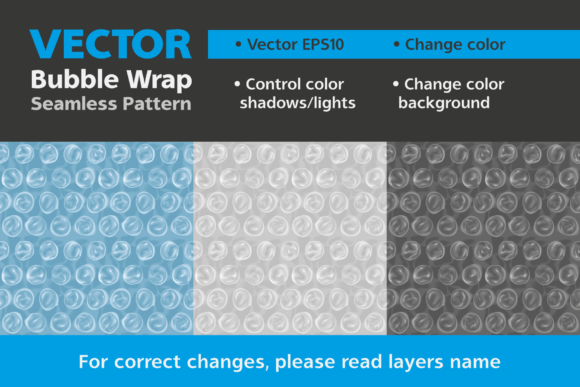
Seamless Pattern Bubble Wrap for Designers
If you have ever needed to communicate fragility, protection, or packaging in a visual project, you likely searched for a bubble wrap texture and ended up with a low-resolution image or a repeating pattern that simply did not hold up. A Seamless Pattern Bubble Wrap vector file solves that problem at the root. Created in Adobe Illustrator and saved as a vector EPS10 file, this asset gives you a mathematically precise, endlessly repeatable bubble wrap texture that you can scale to any size without degradation. The seams are invisible, the bubbles remain consistent, and the file structure is built for real editing, not just static placement.
This article walks through what this vector pattern actually is, why its technical foundation matters, and how you can put it to work across personal projects, client work, commercial packaging, and digital content. Whether you are a freelancer building a mockup library or a marketing lead responsible for shipping collateral, understanding the strengths of a properly constructed seamless pattern will save you time and elevate your output.
What Makes a Seamless Pattern Bubble Wrap Vector Different
A seamless pattern is not just a picture that repeats. It is a tile designed mathematically so that when placed side by side, no edge, color shift, or shadow discontinuity gives away the repetition. In the case of bubble wrap, this means the bubbles align perfectly across tile boundaries. The shadows beneath each bubble, the highlights on top, and the subtle transparent film between them all carry over without a hitch.
Because this file was built in a vector application, every bubble is defined by paths and gradients rather than pixels. You can enlarge it to cover a billboard or shrink it to fit an icon, and the sharpness remains identical. The EPS10 format ensures broad compatibility across design software, and the organized layers allow you to change colors and shadow tones without breaking the artwork. This is not a flattened raster texture disguised as a vector. It is a native vector construction with editable components.
Key Characteristics of This Type of Asset
- True seamless tiling: The pattern repeats without visible joins, making it suitable for large surfaces like packaging wraps, website backgrounds, or textile prints.
- Vector scalability: You can resize the pattern infinitely without losing detail or introducing pixelation. This is critical for print projects where resolution requirements vary.
- Editable layers: The file includes separate layers for the bubble shapes, the highlights, and the shadow elements. Changing the base color or the shadow intensity is straightforward if you work in Illustrator or a compatible vector program.
- EPS10 format: This version of EPS supports transparency, gradients, and complex vector shapes while remaining readable in older and newer software versions.
- Shockproof visual language: The pattern immediately communicates protection and careful handling, which is why it is used so heavily in packaging mockups and shipping graphics.
Practical Applications Across Different Contexts
A seamless bubble wrap pattern is far more than a novelty texture. It serves functional and communicative roles in several environments. When you choose a vector version, you gain flexibility that raster alternatives cannot match.
Packaging Design and Mockups
If you design shipping boxes, protective mailers, or product packaging, this pattern can form the background of a mockup or the actual printed surface. Because it is seamless, you can wrap it around a 3D box mockup in software like Illustrator or Photoshop, and the bubble pattern continues naturally across the faces. For e-commerce brands that want to emphasize secure delivery, using this pattern in product photos or listing graphics reinforces the message of careful packaging.
Freelancers and agencies often create mockup sets for clients. Having a vector bubble wrap pattern that can be recolored to match brand guidelines means you can produce multiple variations quickly. Change the film color to a brand blue, adjust the shadows to a complementary gray, and the entire mockup palette stays consistent.
Digital Content and Web Design
Web backgrounds, hero images, and section dividers benefit from subtle texture. A bubble wrap pattern, when scaled down and softened with opacity, can add a tactile feel to a landing page for a shipping company or a product launch. Because the pattern is vector, you can export it as an SVG for the web, which keeps file sizes small and resolution independent. Marketers and bloggers writing about packaging tips, moving services, or fragile item handling can use the pattern as a visual anchor in featured images or infographics.
Print Collateral and Signage
Business owners who produce printed materials like flyers, brochures, or trade show banners sometimes need a texture that suggests protection or durability. A bubble wrap overlay on a section of a brochure can visually separate content zones. For educators creating handouts about packaging materials or supply chain topics, the pattern provides a clear visual reference that students immediately recognize.
Creative and Hobbyist Projects
Hobbyists working with print-on-demand merchandise, such as phone cases, notebooks, or fabric, can use a seamless bubble wrap pattern as a surface design. The vector format ensures the print file meets the resolution requirements of the printing service. Changing the color to match a personal aesthetic or a seasonal theme takes only a few clicks if you follow the layer structure correctly.
Benefits That Matter in Real Workflows
Understanding the practical advantages of choosing a vector seamless pattern over a raster texture helps you make better decisions when building your asset library.
- Time savings: You do not need to manually clone and align bubbles to create a seamless tile. The hard work is already done.
- Color control: Because the file is layered, you can alter the base color and shadow independently. This is essential when you need to match a specific brand palette or create a dark mode version.
- Shadow accuracy: The shadows in this file are not just black with opacity. They are constructed to follow the curvature of the bubbles. When you change the base color, the shadows should be updated to maintain realism. The layer names guide you on which elements to adjust.
- Cross-platform compatibility: EPS10 can be placed into InDesign, Illustrator, Affinity Designer, CorelDRAW, and many other applications. You are not locked into one ecosystem.
- No resolution limits: Unlike a JPG or PNG pattern that becomes blocky when enlarged, this vector pattern holds its detail at any scale. Print it at 10 inches or 10 feet, and the quality is identical.
Practical Considerations When Using This Pattern
Even a well-made vector file requires some know-how to get the best results. Here are observations based on common usage scenarios.
Opening the File Correctly
The EPS10 file should be opened with a vector program such as Adobe Illustrator. If you try to open it in a raster image editor like Photoshop without proper import settings, you may flatten the layers and lose editability. Always use File > Open in Illustrator, and keep the layers panel visible so you can see the structure. The layer names are intentionally descriptive, so take a moment to read them before making changes.
Changing Colors and Shadows
To change the overall film color, select the layer containing the base bubble shapes and apply a new fill. Do not simply recolor the entire pattern at once, because the shadow and highlight layers need separate treatment. If you want darker shadows, adjust the transparency or color of the shadow layer. If the shadows appear too harsh for a light background, reduce their opacity or shift them to a warmer gray. The goal is to keep the illusion of transparent film with raised bubbles.
Scaling and Tiling
When you apply the pattern as a fill in Illustrator, use the Pattern Options panel to adjust the tile size if needed. You can scale the pattern up or down to match the intended viewing distance. For a website background, a smaller tile size often works best. For a large print piece, a larger tile reduces the repetitive feel.
Combining with Other Elements
This pattern works well as a texture layer over photographs or solid colors. Set the blending mode to Multiply or Overlay and reduce opacity for a subtle effect. For a more prominent look, use the pattern at full opacity and place text or graphics on top with a contrasting color. The bubble texture adds visual interest without overwhelming the composition.
Real-World Observations from Using Vector Patterns
Designers often underestimate how much time a properly constructed seamless pattern saves. I have seen teams spend hours trying to fix the edges of a raster bubble wrap texture in Photoshop, only to end up with visible seams or mismatched highlights. A vector seamless pattern eliminates that entire stage of the workflow. The file arrives ready to use, and the only edits you need are aesthetic ones.
Another observation is that clients respond well to mockups that include realistic textures. When you present a packaging design with a bubble wrap interior or a shipping label with a subtle bubble pattern, the client immediately understands the intended use case. The visual communicates fragility and care without a single explanatory sentence.
For content creators and bloggers, using this pattern in featured images can increase click-through rates because the image signals a practical, tangible topic. Articles about moving tips, product shipping, or packaging hacks perform better when the visual matches the subject. The pattern is instantly recognizable and builds trust with the audience.
Final Thoughts on Choosing a Seamless Bubble Wrap Vector
A seamless pattern bubble wrap vector file is a practical investment for anyone who regularly creates packaging mockups, digital textures, or printed materials. The key factors to evaluate are the seamlessness of the tile, the editability of the layers, and the format compatibility with your tools. This particular asset meets those criteria because it was built in Adobe Illustrator with careful attention to shadow structure and repeatability.
When you open the file, take a moment to explore the layers and understand how the bubbles, highlights, and shadows are organized. That knowledge allows you to customize the pattern confidently and adapt it to projects you may not have initially considered. Whether you are designing a product box, a website background, or a textile print, having a clean, scalable, editable bubble wrap pattern in your toolkit saves time and produces better results.
The next time you need to convey protection, fragility, or careful handling in a visual, reach for a vector seamless pattern. Your future self will appreciate not having to rebuild the texture from scratch.